[TOP]
We call it 'Collecting Good Data'. 'Good' data are not data that show off your school in its best light, but data that you can trust and use to plan changes in school.

[TOP]
- Introduction
- Purposes and planning
- Running a session
- Doing the survey online
- Results and reports
- Responding to results
- Extras

[TOP]
We mostly do survey work, mostly about health, and mostly in schools, but some of what we do is none of those things. We also write reports and offer online research news services, and publish an online journal, Education and Health.
The journal is free and open-access from our website; we very much encourage contributions from practising teachers.

[TOP]
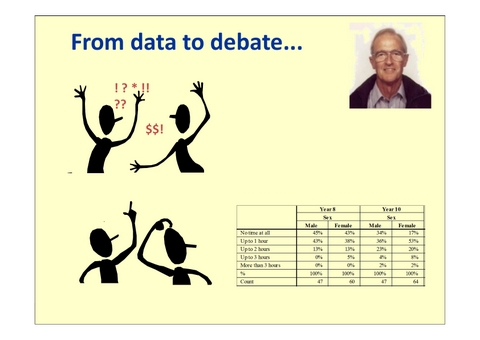
John used to run in-service training sessions in health education for teachers, looking at what should be done in the name of, say, drugs education or sex education, and found he had provoked what were sometimes very heated discussions. One theme of the discussions were claims about what young people in their school were doing -- maybe 'there's none of that in my school' or 'they're all at it'. But do we have any evidence for these claims? They can be based on important local incidents or personal experience, but maybe these are only partial views of what is going on.
John formed the view that an anonymous survey of all pupils could provide a better basis for discussions about what the situation was like locally and what then can be done to support pupils.
[TOP]
Elements of the survey will also link to many elements of a school's PSHE programme. You will also be able to use evidence from the survey to support your school development plan, to provide evidence for a Self-Evaluation Form and other documentation to show the basis for decisions and judgements for OFSTED.

[TOP]

[TOP]
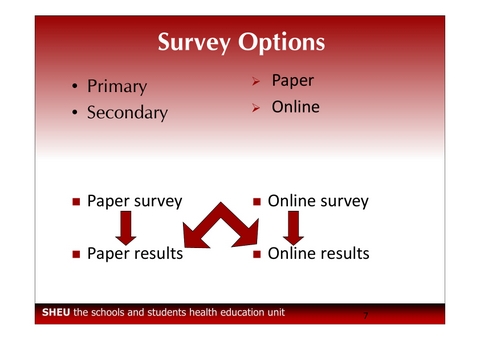
Doing it on paper can enable a whole year group to tackle the survey at the same time (for example, in a hall set out for examinations), involves no IT skills or resources ... and may also feel more confidential for the students, as they may understand how examination papers must be kept secure and the same procedures should be used for the completed survey booklets.
Most of what is below applies to any school, and we will have separate sections for online or paper completion.
We aim to provide parity of service for all schools, so that online schools will get convenient printed reports and paper schools can have their results uploaded to the survey server.
[TOP]
You get a short booklet called 'Collecting Good Data' which echoes the content of this slideshow. There are other materials in the pack:
Online |
Paper |
|
|
Please write to parents/carers to let them know the survey is going on in school. We offer a standard letter which you can use and which we will send you, and if you would like an electronic copy then please email us or download here. There are versions for a primary school (early/late) or a secondary school.

[TOP]
- In a primary school, do go for whole year groups.
- In a secondary school, four classes from a year group would be enough, but there are no limits to the number you can survey online.
- In a special school or PRU, we suggest you survey with as many students who you think will manage the task.

[TOP]
- The pupils should be alerted to the survey in advance and the purpose and confidentiality of the exercise explained
- They should be advised that they do not have to answer any questions that they do not want to.
- It should be made clear that they do not have to take part.

[TOP]
What evidence do we have for pupils' honesty?
- We have worked hard on the design of the questions and for many of them we can compare the answers we get with those from other studies, and typically they match very well.
- We can compare the pupils' answers in one part of the questionnaire with answers elsewhere, and again the match is excellent.
- We have also done many post-questionnaire interviews with pupils, which we say are to check they understood the questions and that they could find the answers they wanted, but we also use to try and detect any deliberate or accidental misrepresentations. We rarely suspect any dishonesty.

[TOP]
- on any school day except a Monday
- in any school week not straight after a holiday
Adequate time is essential; to ensure that the information collected is of the highest quality. Our recommended time period may be longer than your longest lesson with the pupils. It is possible to some of the introductory discussion on the previous day or the lesson just before the survey session.

[TOP]
Younger pupils may be led through the questions as a teacher reads them out, either as a whole class or in smaller groups. We can send you a PDF to display on a screen.
Please provide pupils with additional needs with the support that you might usually offer. This might include
- additional adult support in the room,
- extra time,
- some extra privacy in a separate room,
- a recorded version of the survey,
- the chance to do the questionnaire in bite-sized chunks,
A helper can 'scribe' for a pupil, at cost of confidentiality. Pupils should be reminded that they don't have to answer every question.
We would be pleased to assist in any way we can by providing split booklets, larger type, MP3 recordings or other support.
The online questionnaire has a 'read-aloud' feature; the voice is computer-generated, but quite agreeable to listen to. We can also adjust the size and background colours of web pages.
We might summarise our goal as:
we would like as many questions completed as possible, by as many pupils as possible, in as much comfort as possible.
Pupil comfort is a factor, and if they have had enough, please give them a break or permission to stop.

[TOP]
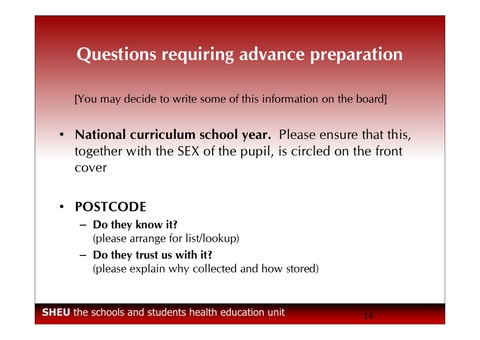
- Your survey may ask for postcodes. The capacity to do an analysis by area is highly valued by local authorities, so we would like as many full postcodes to be collected as possible. If your survey asks for postcodes, please give young people a chance to refresh their memory of their home postcode. The letter to parents/carers can include a prompt to find your home postcode, or a colleague in the school office might be able to run off a list of postcodes for each class.
- Your survey may ask about young carers. Please call the attention of pupils to the definition in the question and explain if need be. We are not asking if pupils care about their parents, nor if they occasionally help out at home.
- Your survey may ask about parents/carers in the armed forces. Please remind pupils: we are asking only about Mum, Dad and other carers in the home, not other family members or relatives.
[TOP]
Moreover, schools don't have to seek postcodes if they don't want to.
Postcodes are used to analyse the results by area, not to locate individuals. We hope that with a clear explanation of what the postcodes are used for, and of our security procedures, they will be willing and able to provide their home postcode.

[TOP]
For example, when we punch in the information from a paper questionnaire, we don't store a young person's whole postcode with the rest of their answers. We replace the last bit of the postcode (the PF of EX2 8PF) with 99 in the files, so, even if we were hacked and someone found the file, they couldn't use the information to find anyone.
We fetch and use the full postcode only when we are drawing maps or doing other analysis by area.

[TOP]

[TOP]
Lots of mapping information is linked to postcodes and this is by far the easiest way to approach it.

[TOP]
Each class needs:
Online |
Paper |
|
|

[TOP]
Do explain to pupils:
- Why the survey is being done and what the school might do with the results.
- That the survey is anonymous and confidential -- or use whatever terms and explanations that you prefer -- so it is safe to be honest.
- That only honest answers will be useful -- so please
- read the question carefully
- give the true answer for you
- leave out any questions you really don't want to answer.

[TOP]
Things should even out over the whole sample, and we won't understand the answers if some pupils are giving an answer that isn't exactly right, even if they are trying to be helpful.
So, please read the question carefully and answer the question as it is put (advice that we remember often giving to pupils!).

During the session, please note any problems on the Supervisor's Notes feedback sheet, particularly if more than one pupil hits the same difficulty with a question.
There may be some early finishers who will need a follow-up activity or destination.
Slow finishers may like extra time, or extra time after a break.
We might summarise our goal as:
we would like as many questions completed as possible by as many pupils as possible in as much comfort as possible.
Pupil comfort is a factor, and if they have had enough, please give them a break or permission to stop.
Do emphasise privacy - between pupils ('test conditions') and between staff and students. Pupils may have familiar separate 'test positions' around the classroom. We suggest a blank questionnaire be available, so reference can be made to it rather than to a pupil's part-completed questionnaire, to ensure their privacy.
Some pupils will welcome additional adult help available in the room, and some pupils may need one-to-one support throughout. Complete confidentiality may be impossible in such conditions, so pupils should be encouraged to 'pass' if they feel compromised.
If completing the survey using paper booklets, you might like to have to hand a large pre-labelled envelope in which to place and seal the completed questionnaires, just as you might do with examination papers.
Do remind pupils about sources of support in and out of school for issues in the questionnaire that may be affecting them.

What's special about doing it online?
[TOP]
You will need to book your IT suite and ensure that each pupil in each group has a working computer each, with sufficient privacy to complete the survey in comfort.
The arrangement of screens may not lend itself to perfect privacy, so do emphasise to the pupils that they need to look after each other and keep their eyes on their own answers.
IT suites are often busy, so to get a whole year group through in good time, you may prefer to revert to the paper version.

[TOP]
Pupils click on the pupil login button. To log in they just need to know the four-digit school 'name'.
The actual name of the school should be shown on the next page that they reach; if it's the name of a different school, please check the number!

[TOP]
One feature of the online survey is worth noting:
- Round answer buttons = choose one answer from a list
- Square answer buttons = choose as many answers as is right for you

[TOP]
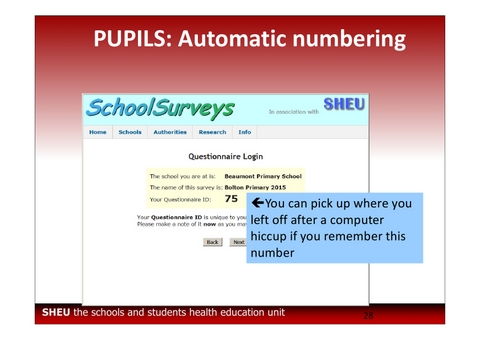
When first logging in, the server will ask you for an ID number, which they won't have yet.
Each respondent will be given a number by the server once they start.
The ID number is used to resume completion of the questionnaire after a break.

[TOP]
We recommend you go through the whole questionnaire as if you were a pupil.
If you use the ID number 'TEST' then the server will not record your answers as part of your school's survey.
And please use a computer that the pupils will be using. The Internet settings for your own computer may be different, and we sometimes have school 'parental' control filters take exception to one of our questions.
If your school routinely uses iPads or other tablet computers, we think the survey will still work as intended, but whatever system you use, please check the survey using the systems that the pupils will be using.

[TOP]
The number will allow a student to resume completion after a break.
If they don't remember the number, they will have to abandon the part-completed questionnaire.
[TOP]
The questions are served up in page-fulls, and saved away that way too. The pages are numbered and show a completion bar.
We use a standard typeface, but can change it to suit your pupils. The size of the text can be adjusted by each pupil, either using their browser settings or the 'text size' buttons on the page.

[TOP]
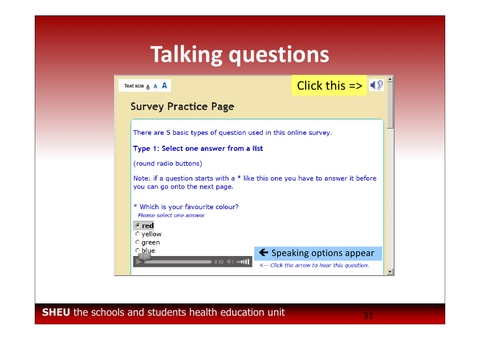
If the student clicks somewhere close enough to one of the answers, it will register the answer and highlight the answer chosen.
The answers click off in the same way.

If you click on the 'ear+speaker' icon top right, you get sliders added to each question.
If you click on the arrow on the slider, the question will be read over the computer speaker.
This could make for a noisy atmosphere, so do provide headphones for students who might use this feature.
[TOP]
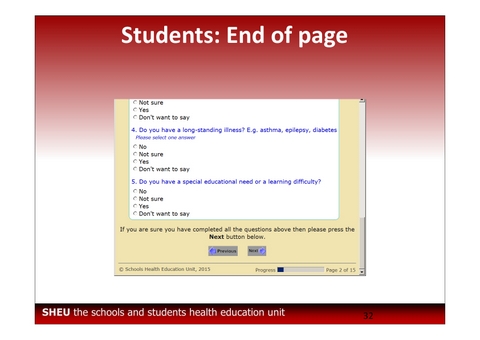
Try it. Leave out a question and click on 'Next' at the bottom of the page.
[TOP]
Whether you complete the missed questions or not, if you click 'Next' again, you get the next page.

[TOP]
Please bear this in mind if you are reading out the questions to a group.

[TOP]
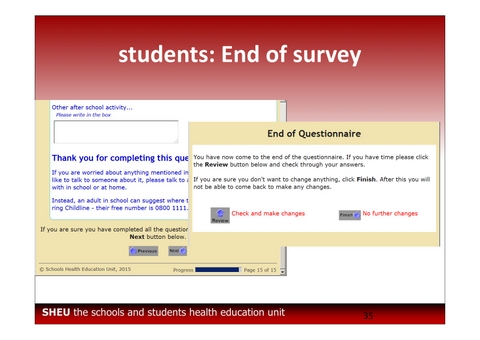
If you click 'Finish', you are taken to one last page.
[TOP]
Primary-age pupils are invited to look at the CBBC Newsround Health pages.
Secondary-age pupils are invited to go to the NHS Change4Life site.

[TOP]

[TOP]
- turn the survey on and off,
- look at results,
- and explore the results using different breakdown tables and charts.
[TOP]
You are allowed, and even encouraged, to change your password.
If you change it, and then forget it, then we can't fetch it for you, but give us a call and we can give you a new password, and you can choose it.

You log in, browse to the 'Surveys' page, and change the 'State' from 'Running' to 'Finished'.
Everything will still work the same if you don't do this, except that if you do, we will know you don't plan to survey any more pupils and we can start checking and preparing reports.

[TOP]
Completing on paper means you will get the results more slowly and it may have funding implications; if you haven't been invited to choose between online and paper routes, please contact our office.
[TOP]
There are other sheets in the pack:
- one-page Quick Guide
- one-page Supervisor's Guide
- one-page Supervisor's Notes
- Two sided School Information Sheet (yellow)
- Letter for parents/carers

- please ensure that they are parcelled up securely in as few packages as possible
- please enclose any sheets of Supervisors? Notes (regardless of how much or little information they may contain).
- please enclose as well your Yellow School Information Sheet for our records (one is loose in your pack and there is a copy in the manual).
We will send you two labels for each parcel: one to go on the parcel and one to hand to the courier.
The labels have bar codes, so we will email you a PDF to print.

What's the fastest way to look at our results?
[TOP]
[TOP]

[TOP]

[TOP]

[TOP]
If you just click 'next', you get the results in the default format, broken down by age and sex.
[TOP]
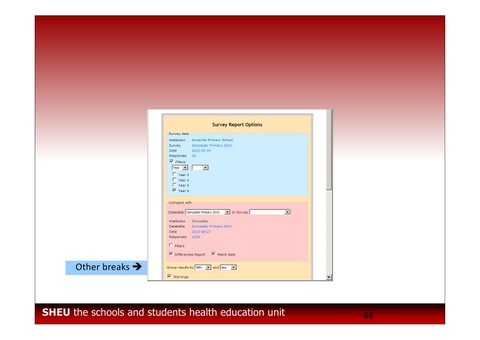
The comparison group may not be made live until the last school has completed the survey. If you are the first school to complete, you have longer to look at your own results, but will have to wait for a local comparison.

[TOP]
The top of the page explains the sample and the breakdown chosen (blue) and, if selected, the comparison group (pink).

[TOP]

[TOP]
If you chose a comparison sample, these results will be shown in brackets beside your results, and the overall percentages for the comparison sample will be shown as pink bars.
[TOP]
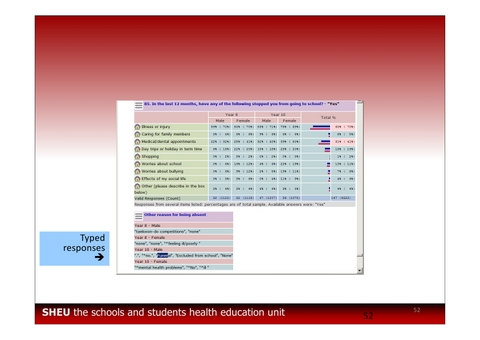
- responses that duplicate question options will be replaced with a '*'
- swearing will be deleted
- people's names will be replaced with a '*'
[TOP]
The '99% confidence' means that the computer has calculated than in only 1% of surveys would you get a result so different just by chance. It's like getting a perfect hand of 13 spades -- either it's not a typical pack of cards (a real difference) or by chance you have had a very unusual shuffle.

[TOP]
If you look at the table, there will be a pair of answers which contrast.

[TOP]
Look for the 'meter' icon on your tables at the start of each row, and click on it.
[TOP]

[TOP]
We will send you a school report, a booklet of ideas, an order form for extras and (perhaps) a set of plain results tables.

[TOP]
The sample sizes are shown throughout.
Very small samples may be merged to give a less wobbly and more surely anonymous set of results.

[TOP]
We will send a paper copy in the post, as this seems the most reliable way of letting you know it is available, but we can and will email a MS Word for Windows version on request.


[TOP]

[TOP]

[TOP]

[TOP]
In the body of the report, each headline is repeated, but will have additional breakdown by age and sex, for your school and for the comparison sample, and perhaps some extra charts and analysis.
There is probably more detail here than you need to pay attention to; use the lists of differences to guide you to the most important topics and findings.

Please take your time, enlist some help, and do recognise that most of these questions report behaviour that doesn't go on in school and which you may not be able to change, even with help.

[TOP]
We will send with the report an 'After the Survey' booklet, containing suggestions of how to work with the results in your school.

[TOP]
[TOP]

[TOP]
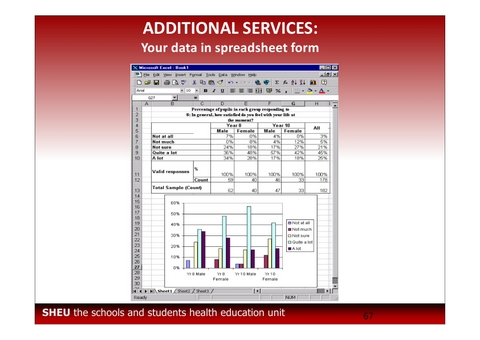
We then get some very large samples for some important aspects of young people's lives. You can buy the report, of course, but the headlines can be seen on our website.
These aren't really 'national' figures: they come from the changing and to some extent accidental sample of schools taking part in the surveys in any one year. But the population of schools in our databanks are a reasonable match to the national sample, our results usually do match genuinely national samples where we can see an overlap, and so we might be allowed to hope that they are fairly representative of the national numbers where we have no direct comparison.

[TOP]

[TOP]
Your own school results will normally be kept confidential to your school. You can share them if you like, but that's up to you.
It is possible that the local Authority will make it a condition of your participation that selected officers will have access to your school's results.

What about other local schools?
[TOP]

[TOP]
[TOP]
We still have an old-school fax, and will attempt to catch and care for messenger pigeons.

What about special schools?
[TOP]

[TOP]
- shortening
- simplifying
- splitting
- illustrating
We have Widgit symbol software and can sprinkle these
throughout your questionnaire.

[TOP]
